Free Character Sprites
A game usually needs its player character before it needs anything else, and it is the hardest asset to find for free. Many free packs give you one idle pose and stop. The character sprites on this page come with the animations you actually code against. The SpriteGen knight has separate 8-frame sheets for idle, walk, run, jump, and a spell cast, all drawn on the same 4×2 grid with the same cell size, so you can swap states in a state machine without re-aligning anything.
Alongside the knight you will find single-pose characters: an armored knight in a red cape, a forest mage, a shadow ninja, a scout robot, and a pumpkin ghost. They work as portraits, NPCs standing in a town, or as the reference image for your own animation. The dark knight swinging his axe is here too, since a good enemy is still a character.
When you import a sheet, set the frame size to the cell size shown on its page and turn off texture filtering if you scale it up. If you need this character doing something else, like climbing, taking a hit, or riding a mount, open the generator, upload the sprite as a reference, and ask for the new action. It keeps the same look.
- [IMG-001]
红发剑士行走精灵图
- [IMG-002]
Black-Hat Mage Idle Sprite Sheet
- [IMG-003]
Maga lanzando hechizos: hoja de sprites
- [IMG-004]
Tread-Legged Robot Walk Sprite Sheet
- [IMG-005]
Blue-Haired Pot-Lid Girl Idle Sprite Sheet
- [IMG-006]
Bearded Hooded Character Idle Sprite Sheet
- [IMG-007]
Orange Flat-Top Duck Walk Sprite Sheet
- [IMG-008]
Navy Cap Brawler Walk Sprite Sheet
- [IMG-009]
White Jersey Footballer Walk Sprite Sheet
- [IMG-010]
Anime Pharaoh Mummy Girl Fire Orb Sprite Sheet
- [IMG-011]
Anime Pharaoh Mummy Girl Idle Sprite Sheet
- [IMG-012]
Blue-Scarf Brawler Punch Attack Sprite Sheet
- [IMG-013]
16-bit Dark Knight Walk Cycle Sprite Sheet
- [IMG-014]
Blue-Skinned Zombie Woman Walk Cycle Sprite Sheet
- [IMG-015]
Chibi Leaf Spirit Side-View Sprite Sheet
- [IMG-016]
Leaf Spirit Back-View Walk Cycle Sprite Sheet
- [IMG-017]
Chibi Priestess Idle Breathing Sprite Sheet
- [IMG-018] Official
Pixel Knight Idle Sprite Sheet
- [IMG-019] Official
Pixel Knight Walk Cycle Sprite Sheet
- [IMG-020] Official
Pixel Knight Run Sprite Sheet
- [IMG-021] Official
Pixel Knight Jump Sprite Sheet
- [IMG-022] Official
Pixel Knight Spell Cast Sprite Sheet
- [IMG-023] Official
Pixel Dark Knight Axe Attack Sprite Sheet
- [IMG-024] Official
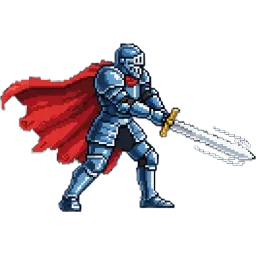
Pixel Armored Knight Sprite
- [IMG-025] Official
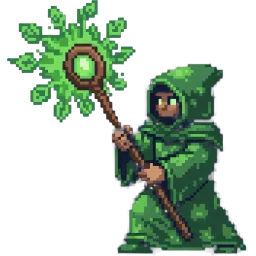
Pixel Forest Mage Sprite
- [IMG-026] Official
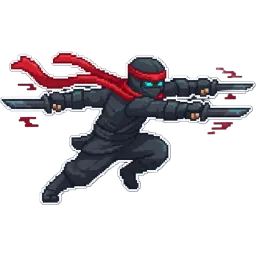
Pixel Shadow Ninja Sprite
- [IMG-027] Official
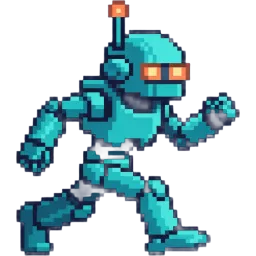
Pixel Scout Robot Sprite
- [IMG-028] Official
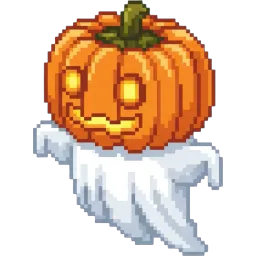
Pixel Pumpkin Ghost Sprite
Free Character Sprites With Real Animation States
Most free character sprites stop at a single idle pose, which is fine for a mock-up and useless once your player needs to move. The character sprites here are built around the states a game actually codes against. The SpriteGen knight comes with five separate sheets: idle, walk, run, jump and a spell cast. Each one has 8 frames on a 4×2 grid, and the idle, walk, run and jump sheets all use the same 209×236 pixel cell (the cast is 209×235), so switching states in code does not shift the character by a single pixel.
That consistency is what makes free character sprites usable in a real project. The same armor, the same palette and the same proportions carry across every sheet, so the knight still looks like the same knight when he stops, starts running or leaves the ground.
Every Free Character Sprite on This Page
There are eleven free character sprites here in two kinds. The first kind is animated. Besides the knight's five sheets, there is a horned dark knight who raises a double-bladed axe, slams it down and returns to guard, drawn as a 4-frame strip with 200×276 pixel cells. He is a character in his own right, useful as a rival, a boss or an elite enemy.
The second kind is the single pose: an armored knight in a red cape mid-swing, a forest mage raising an emerald staff, a shadow ninja dashing with twin blades, a teal scout robot with orange visor eyes, and a pumpkin ghost on a drifting sheet. Each is one 256×256 PNG with a transparent background. Single poses are the right tool for dialogue portraits, character select screens, NPCs standing in a town, class cards and store page art, anywhere one strong image says who the character is.
Building a Player Controller From Free Character Sprites
With the knight's sheets you can build a complete platformer controller. Start in idle and loop it slowly at 6 to 8 frames per second. When the player presses a direction, switch to walk at 8 to 12 frames per second, and to run when they hold a sprint button or keep moving for a moment. The jump sheet is drawn in place: play the take-off frames when the jump starts, hold the tuck frame in the air, and play the landing frames when the character touches the ground. The cast is a one-shot, so play it once and return to idle.
The knight is drawn facing one way. Instead of drawing a second set, mirror the sprite horizontally when the character turns around. In Unity that is flipX on the Sprite Renderer, in Godot flip_h on the AnimatedSprite2D, and in Phaser setFlipX. One set of free character sprites then covers both directions.
Mixing Free Character Sprites From Different Sources
Most games end up combining characters from several places, and the seams show when sizes and palettes do not match. The official characters here share a style, but their cells differ: the knight sheets are 209×236, the dark knight is 200×276 and the portraits are 256×256. Scale them in your engine so the characters stand at a consistent height on screen, rather than resizing the PNG files themselves.
When you add free character sprites from another pack, compare the outline thickness and the number of colors first. A thick black outline next to a soft painted sprite looks like two different games. If a character almost fits, recolor it to share a few key colors with the rest of the cast, such as skin tones and the main armor color.
Extend These Free Character Sprites With the Generator
No free pack covers every action your story needs. When the knight has to climb, block, take a hit or fall, open the SpriteGen generator, upload the character as a reference image and describe the new action. The result is a new sprite sheet that keeps the same look. You can do the same with a single pose: give the forest mage a walk cycle, or turn the ninja portrait into a running animation, and keep going until the character has every state the game needs.
Free Character Sprites FAQ
[+] Which free character sprites here are animated?
The SpriteGen knight has five animated sheets (idle, walk, run, jump and spell cast, 8 frames each), and the dark knight has a 4-frame axe attack. The armored knight, forest mage, ninja, scout robot and pumpkin ghost are single poses.
[+] Do the knight's sheets line up with each other?
Yes. Idle, walk, run and jump all use 209×236 pixel cells on a 4×2 grid. The spell cast is 209×235, so slice that one at its own size.
[+] How do I make a character face left and right?
Flip the sprite horizontally in your engine: flipX in Unity, flip_h in Godot, setFlipX in Phaser. One set of frames covers both directions.
[+] Can I use these character sprites as my game's main character?
Yes. They are free for personal and commercial games with no credit required. Just don't resell them on their own as an asset pack.
[+] Can I get more animations for the same character?
Upload the sprite as a reference in the SpriteGen generator and describe the action, such as climbing or taking a hit. It returns a new sheet in the same style.