Pixel Shadow Ninja Sprite
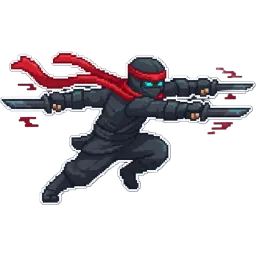
A black-clad ninja in a low dash with twin blades drawn and a red headband streaming behind. A single 256×256 PNG with a transparent background.
Settings
- Image size
- 256 × 256
- Cell size
- 256×256
How to use the Pixel Shadow Ninja Sprite
A black-clad ninja in a low dash, twin blades drawn, a red headband streaming behind. It is a single action pose full of speed, the kind of image that sells an agile character before the player has even pressed a button.
The file is a single 256×256 PNG with a transparent background. Import it as one sprite: Sprite Mode Single in Unity, a Sprite2D in Godot, or this.load.image in Phaser. There is no grid to slice. When you scale it up, use nearest-neighbor filtering so the black outfit keeps its crisp edges against the background.
The dash pose makes it a natural fit for a character select screen, a dialogue portrait for a rogue or assassin, a card in a card battler, or a boss introduction splash. It also works as the key art for a small action game or a thumbnail for your devlog. The red headband gives it a signature color, so it stays readable even when shown small in a HUD.
This ninja is not tied to any fantasy or sci-fi setting, which makes it easy to fit into different games. If you need it to run, attack or throw a shuriken, use the image as a reference in the SpriteGen generator and ask for each action. Each one comes back as a sprite sheet in the same style.