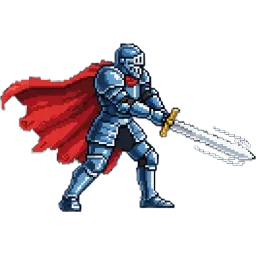
Pixel Armored Knight Sprite
A steel-plated knight with a red cape mid-swing, his blade leaving a motion streak. A detailed hero portrait pose. A single 256×256 PNG with a transparent background.
Settings
- Image size
- 256 × 256
- Cell size
- 256×256
How to use the Pixel Armored Knight Sprite
This is a single, detailed pose rather than an animation: a steel-plated knight in a red cape, caught mid-swing with his blade leaving a motion streak. It is built to be looked at, which makes it a strong hero portrait, a character select image or a key visual for a store page.
The file is one 256×256 PNG with a transparent background. There is no grid to slice. Import it as a regular single sprite: Sprite Mode Single in Unity, a Sprite2D in Godot, or this.load.image in Phaser. If you scale it up, set the texture filter to nearest (Point in Unity, Nearest in Godot, pixelArt: true in the Phaser game config) so the edges stay crisp.
Because the pose is dynamic, it works best in places where a character is introduced or celebrated: a dialogue portrait next to a text box, a class card in a character creation screen, a victory screen, or the cover of your game's devlog. It also makes a good NPC standing in a castle courtyard, where a single frame is all you need.
If you want this knight to walk, attack or block in game, use the image as a reference in the SpriteGen generator and ask for the actions you need. It returns a sprite sheet that keeps the armor, cape and colors.