Free RPG Sprites
Every RPG runs on the same loop: fight something, open what it drops, spend the gold, get stronger. This page collects the free RPG sprites for that loop from the official SpriteGen pack, seven pieces that belong in a role-playing game.
First the loot. A treasure chest rattles, pops its lid and reveals gold; play it once when the player opens it. A potion bubbles in a corked flask, a kite shield catches a sweeping glint, and a gold coin spins for currency pickups. All four are 4-frame strips with 200×267 pixel cells. Then the party: an armored knight in a red cape and a forest mage with an emerald staff, two classic classes drawn as 256×256 portraits for a party menu, a dialogue box or a class select screen. Finally, something to fight for the loot: a horned dark knight whose 4-frame axe slam telegraphs its swing, a readable mini-boss.
The walking hero and the looping monsters live on the Characters and Animated pages, and together with this page they make a first dungeon. When your story needs something this page lacks, like a merchant, a skeleton archer or a key, describe it in the generator and it comes back as a transparent sheet in the same format.
- #Characters
- #Animated
- #RPG
- [IMG-001]
红发剑士行走精灵图
- [IMG-002]
Black-Hat Mage Idle Sprite Sheet
- [IMG-003]
Maga lanzando hechizos: hoja de sprites
- [IMG-004]
Royal Guard Elf Sprite Sheet
- [IMG-005]
16-bit Dark Knight Walk Cycle Sprite Sheet
- [IMG-006]
Chibi Priestess Idle Breathing Sprite Sheet
- [IMG-007] Official
Pixel Dark Knight Axe Attack Sprite Sheet
- [IMG-008] Official
Pixel Treasure Chest Opening Sprite Sheet
- [IMG-009] Official
Pixel Potion Bottle Sprite Sheet
- [IMG-010] Official
Pixel Shield Shine Sprite Sheet
- [IMG-011] Official
Pixel Gold Coin Spin Sprite Sheet
- [IMG-012] Official
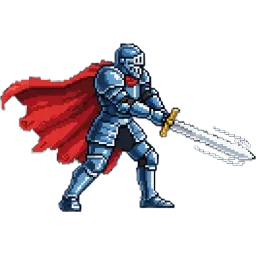
Pixel Armored Knight Sprite
- [IMG-013] Official
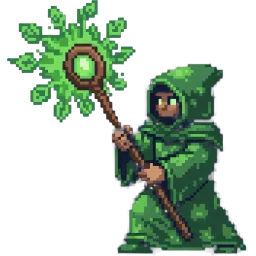
Pixel Forest Mage Sprite
Free RPG Sprites for Loot, a Party and a Mini-Boss
An RPG needs art that other genres don't: loot worth picking up, class portraits for the party screen, and bosses that telegraph their attacks. This page is only that. It holds seven free RPG sprites from the official SpriteGen pack: four animated loot items, two party portraits and one mini-boss, all in the same pixel art style so they sit together on one screen.
Every sprite is a transparent PNG with its grid, frame count and cell size listed on its page. The animated ones play in the preview, so you can watch the chest open or the dark knight swing before you download anything.
Animated Loot: Free RPG Sprites for Chests, Potions, Shields and Coins
Rewards are the heart of an RPG, and animation makes them feel like rewards. The treasure chest rattles, pops its lid and reveals gold. It is a one-shot: play it once and hold the open frame, and spawn the actual item on that last frame rather than on the button press, so opening the chest feels earned.
The other three items loop. The potion bubbles in its flask; tint it red, blue or green in code for health, mana and poison. The shield catches a sweeping glint, a clean way to mark an equipment drop; add a short pause between glints. The gold coin turns from face to edge for currency pickups. All four are 4-frame strips in a single row with 200×267 pixel cells, so they share one import setting.
Free RPG Sprites for Your Party: a Knight and a Mage
Two single-pose characters cover the classic RPG classes. The armored knight in a red cape, caught mid-swing with a motion streak behind his blade, is your warrior, a captain of the guard or the fighter on a class select screen. The forest mage in a green leaf robe, raising a staff crowned with a glowing emerald, is the healer, the druid or the wise NPC who sends the party out.
Both are 256×256 PNGs with transparent backgrounds. Portraits are what RPG menus are made of: the party list, the dialogue box, the equipment screen and the save file. If you want either of them walking around the map, upload the portrait to the generator as a reference and ask for a walk cycle.
A Free RPG Sprite Mini-Boss: the Dark Knight
A good RPG boss tells the player what it is about to do. The horned dark knight raises a double-bladed axe overhead, slams it into the ground and returns to guard, in 4 frames on a single row with 200×276 pixel cells. The raised-axe frame is the telegraph: hold it a little longer than the others, around a third of a second, so the player has time to dodge or block.
Use him as the guardian at the end of a first dungeon, an elite enemy in a castle, or a rival who turns up more than once. Play the attack once per swing and return to the first frame between attacks; raise the frame rate for a later, angrier phase of the fight.
Building an RPG Prototype With These Free RPG Sprites
Start with one room: the SpriteGen knight from the Characters page, a few slimes from the Animated page, a chest that drops a potion, and the dark knight at the door. Get the fight and the loot feeling good, then add coins for currency, the shield as an equipment drop, and the knight and mage portraits for the party menu. That is a complete vertical slice from free sprites alone.
One thing to plan for: these sprites are drawn for side view, which suits side-scrolling action RPGs and turn-based battle screens. A classic top-down RPG needs characters facing four or eight directions. When you need those, or a merchant, a skeleton archer or a mount, describe it in the SpriteGen generator and choose a top-down view and the directions. It comes back as a sheet in the same format.
Free RPG Sprites FAQ
[+] What RPG sprites are on this page?
Seven: a treasure chest, a potion, a shield and a gold coin, all animated; an armored knight and a forest mage as party portraits; and a dark knight mini-boss with an axe attack.
[+] Where are the RPG monsters and the walking hero?
The looping monsters, from the slime to the dragon, are on the Animated page, and the knight's walk, run, jump and spell-cast sheets are on the Characters page.
[+] Are these RPG sprites top-down or side view?
They are drawn for side view, which suits side-scrolling action RPGs and battle screens. For top-down characters in four or eight directions, use the generator's top-down view.
[+] Can I use these RPG sprites in an RPG Maker game?
They are licensed for commercial games, but RPG Maker expects its own character sheet layout, so you'd need to rearrange the frames into that layout first.
[+] How do I make potions in different colors?
Tint the potion sprite in code, or recolor a copy in the Pixel Art Maker. One sheet gives you health, mana and poison potions.