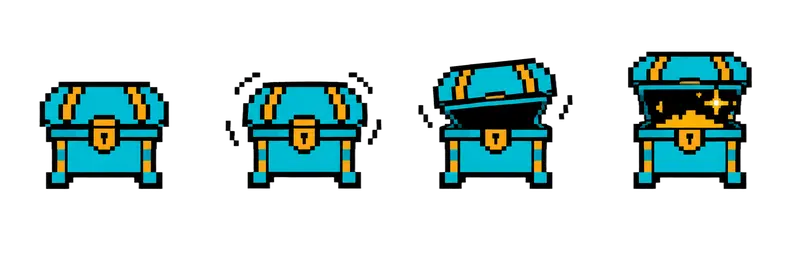
Pixel Treasure Chest Opening Sprite Sheet
A closed chest that rattles, pops its lid, and opens to reveal glittering gold. Play it once when the player loots it. 4 frames in a single row, 200×267 px per cell (800×267 PNG, transparent background).
Settings
- Image size
- 800 × 267
- Grid
- 4 × 1
- Cell size
- 200×267
- Frames
- 4
How to use the Pixel Treasure Chest Opening Sprite Sheet
Opening a chest is one of the most satisfying moments in a game, and this sheet gives it a proper animation. The closed chest rattles, pops its lid and opens to reveal glittering gold. It is a one-shot animation, not a loop: play it once when the player loots the chest and then hold the last, open frame.
The file is an 800×267 transparent PNG with 4 frames in a single row. Each cell is 200×267 pixels, the same frame size as the potion, shield and coin strips, so all the loot shares one import setting.
Slice it into 4 columns and 1 row at 200×267. In Unity, use Grid By Cell Size and turn off Loop Time on the animation clip. In Godot, add frames from the sheet with 4 horizontal and 1 vertical and uncheck Loop for that animation. In Phaser, create the animation with repeat set to 0 and listen for the animation complete event. The first frame doubles as the closed chest you place in the level, so you do not need a separate sprite for it.
Spawn the reward on the last frame, when the gold appears, rather than on the button press. It makes the moment feel earned. Use it for dungeon rewards, hidden secrets, quest completions or daily login gifts, and add a short sound on the lid pop for extra punch.