Pixel Dark Knight Axe Attack Sprite Sheet
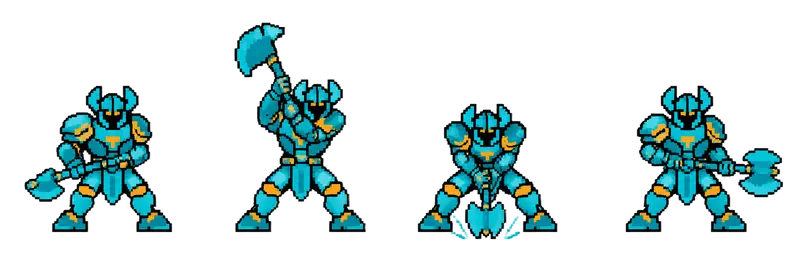
A horned dark knight raises a double-bladed axe overhead, slams it into the ground, and returns to guard: a readable telegraph for a mini-boss. 4 frames in a single row, 200×276 px per cell (800×276 PNG, transparent background).
Settings
- Image size
- 800 × 276
- Grid
- 4 × 1
- Cell size
- 200×276
- Frames
- 4
How to use the Pixel Dark Knight Axe Attack Sprite Sheet
A good enemy attack tells the player it is coming. This horned dark knight raises a double-bladed axe overhead, slams it into the ground, and returns to guard, so the wind-up gives the player time to dodge. It is a clear, fair telegraph for a mini-boss or an elite enemy.
The PNG is 800×276 pixels with a transparent background. It holds 4 frames in a single row, and each cell is 200×276 pixels. That is taller than the 200×267 cells of the other monster strips, because the axe is raised high above his head, so give this sheet its own frame size when you slice it.
In Unity, use Grid By Cell Size at 200×276. In Godot, add frames from the sheet with 4 horizontal and 1 vertical. In Phaser, load it with frameWidth 200 and frameHeight 276. Play the animation once per attack rather than looping it: hold the raised-axe frame a little longer as the warning, then play the slam quickly and enable the hitbox only on the impact frame.
Put him at the end of a castle level, use him as a rival who appears several times, or make him the first enemy that punishes button-mashing. Because he is a character, not just a monster, he also works in a cutscene where the dark knight blocks the hero's path. For a full move set, generate idle and walk sheets for him with the SpriteGen generator.