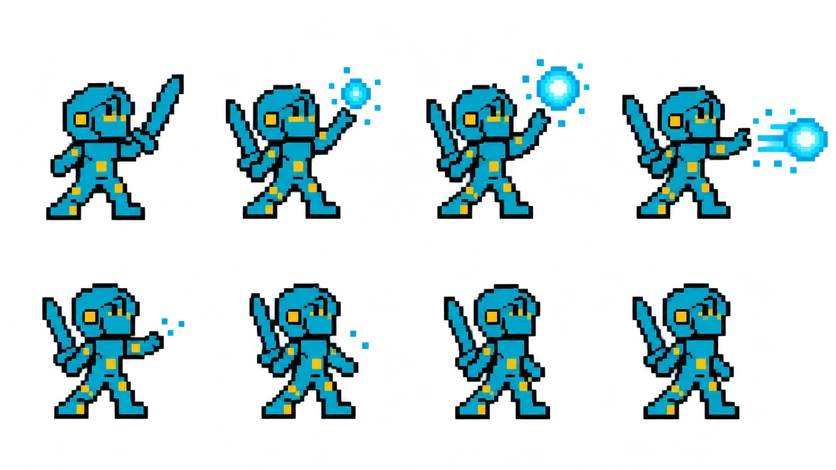
Pixel Knight Spell Cast Sprite Sheet
The knight charges a blue energy orb in his free hand and throws it forward, then settles back as the sparks fade. 8 frames in a 4×2 grid, 209×235 px per cell (836×470 PNG, transparent background).
Settings
- Image size
- 836 × 470
- Grid
- 4 × 2
- Cell size
- 209×235
- Frames
- 8
How to use the Pixel Knight Spell Cast Sprite Sheet
The spell cast gives the knight a ranged attack. He gathers a blue energy orb in his free hand, throws it forward, and settles back as the sparks fade. It turns a sword fighter into a battle mage without drawing a new character, and it pairs with the idle sheet for a clean return to rest.
The PNG is 836×470 pixels with a transparent background and holds 8 frames on a 4×2 grid, read left to right, top row first. Note the cell size: 209×235 pixels, one pixel shorter than the knight's other sheets. Slice this sheet at 209×235 on its own; if you slice it at 209×236 like the others, the bottom row will drift by a pixel.
In Unity, use Grid By Cell Size with 209×235. In Godot, add frames from the sheet with 4 horizontal and 2 vertical and Godot works out the cell size for you. In Phaser, load it with frameWidth 209 and frameHeight 235. Play it once, not on a loop, at around 10 to 12 frames per second, and spawn your projectile on the frame where the orb leaves his hand so the hit lines up with the art.
Use it for a fireball button in an action game, a spell command in a turn-based battle, or a special attack with a cooldown. Tint the orb in code if you want fire or poison variants from the same sheet.