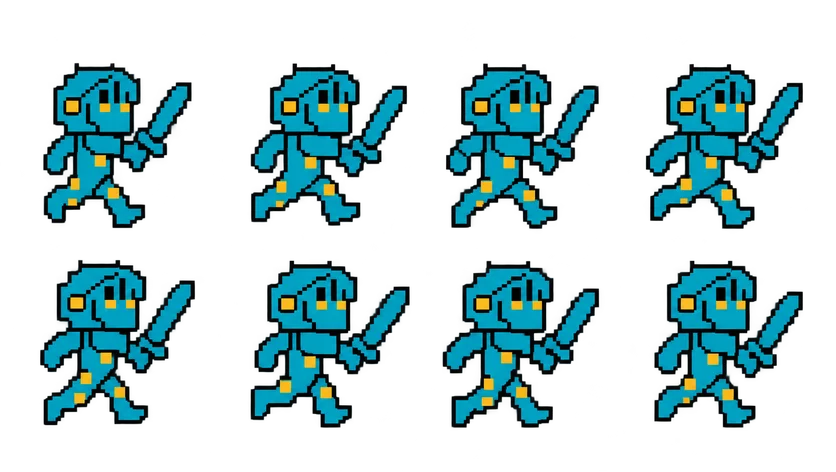
Pixel Knight Run Sprite Sheet
The knight leaning forward into a full sprint with his sword swinging behind him, a faster and longer stride than the walk. 8 frames in a 4×2 grid, 209×236 px per cell (836×472 PNG, transparent background).
Settings
- Image size
- 836 × 472
- Grid
- 4 × 2
- Cell size
- 209×236
- Frames
- 8
How to use the Pixel Knight Run Sprite Sheet
The run is the knight's fast gear. He leans forward into a full sprint, takes a longer stride than in the walk, and his sword swings behind him with the motion. It is drawn to follow the walk cycle, so a player who holds a sprint button sees the same character speed up rather than a different animation pasted in.
The PNG measures 836×472 pixels with a transparent background and holds 8 frames on a 4×2 grid. Read the top row left to right, then the bottom row. Each cell is 209×236 pixels, the same as the idle, walk and jump sheets, so all four share a single frame size in your engine.
Set the frame size to 209×236 when you slice it. In Unity, that is Grid By Cell Size in the Sprite Editor with Sprite Mode set to Multiple. In Godot, add frames from the sheet with 4 horizontal and 2 vertical. In Phaser, use this.load.spritesheet with frameWidth 209 and frameHeight 236, then build a looping animation from frames 0 to 7. A run usually plays a bit faster than a walk, around 10 to 14 frames per second.
Blend into it after the player has walked for a moment, or map it to a dash button. It also works for a chase scene, an escape sequence in an endless runner, or a knight NPC racing across a battlefield in a cutscene.