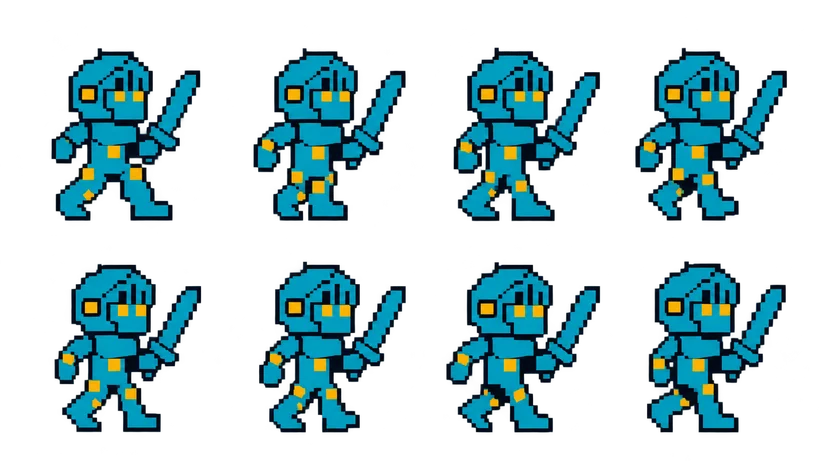
Pixel Knight Walk Cycle Sprite Sheet
A side-view walk cycle for the knight, sword held upright, with alternating steps that loop cleanly for a platformer or top-down town. 8 frames in a 4×2 grid, 209×236 px per cell (836×472 PNG, transparent background).
Settings
- Image size
- 836 × 472
- Grid
- 4 × 2
- Cell size
- 209×236
- Frames
- 8
How to use the Pixel Knight Walk Cycle Sprite Sheet
A walk cycle is the animation players watch more than any other, so it has to loop without a hitch. This one shows the SpriteGen knight in side view with his sword held upright, stepping forward with alternating legs. The last frame leads back into the first, so you can play it for as long as the player holds a direction.
The file is an 836×472 transparent PNG with 8 frames on a 4×2 grid, read left to right across the top row and then the bottom row. Each cell is 209×236 pixels, identical to the knight's idle, run and jump sheets. Because the cell size matches, you can switch from idle to walk on the same frame and the knight stays in place instead of jumping a few pixels sideways.
Slice it with a 209×236 frame size: Grid By Cell Size in Unity's Sprite Editor, 4 horizontal by 2 vertical in Godot's SpriteFrames, or frameWidth 209 and frameHeight 236 in a Phaser spritesheet load. Most walk cycles look right between 8 and 12 frames per second. Match the playback speed to how fast the character actually moves, or his feet will look like they slide across the floor.
The knight faces one direction; mirror the sprite horizontally for the other one instead of drawing a second sheet. Use it for exploring a town, patrolling a castle, or as the base speed in a platformer before the player breaks into the run.