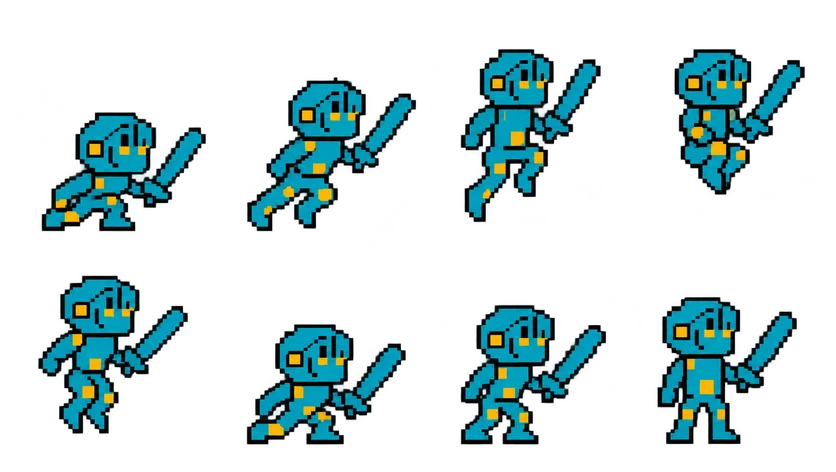
Pixel Knight Jump Sprite Sheet
A complete jump: crouch, take-off, tuck at the peak, and landing back in a ready stance, drawn in place so your code controls the height. 8 frames in a 4×2 grid, 209×236 px per cell (836×472 PNG, transparent background).
Settings
- Image size
- 836 × 472
- Grid
- 4 × 2
- Cell size
- 209×236
- Frames
- 8
How to use the Pixel Knight Jump Sprite Sheet
This sheet covers the whole jump in one animation: the knight crouches, springs off the ground, tucks at the top of the arc, and lands back in a ready stance. It is drawn in place, meaning the knight does not rise inside the cells. Your physics code moves the sprite up and down, and the animation only supplies the pose, which is how platformers usually want it.
The PNG is 836×472 pixels with a transparent background. There are 8 frames on a 4×2 grid, read left to right along the top row and then the bottom row, and each cell is 209×236 pixels, the same frame size as the knight's idle, walk and run sheets.
Slice it at 209×236 in any engine. A simple setup plays the first frames on take-off, holds the tuck frame while the character is in the air, and plays the landing frames when the ground check succeeds. In Godot you can drive this from velocity.y; in Unity an Animator with separate rising and falling states does the same job; in Phaser you can set the frame directly with setFrame based on the body's vertical speed.
The same sheet covers hops onto ledges, a double jump if you replay the take-off frames, or a victory leap at the end of a level. For a longer hang time, hold the peak frame rather than slowing the whole animation down.