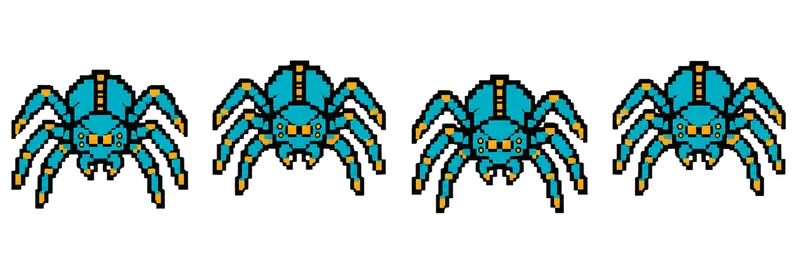
Pixel Giant Spider Idle Sprite Sheet
A front-facing mechanical spider shifting its eight legs as it waits, suited to a cave boss or a top-down arena. 4 frames in a single row, 200×267 px per cell (800×267 PNG, transparent background).
Settings
- Image size
- 800 × 267
- Grid
- 4 × 1
- Cell size
- 200×267
- Frames
- 4
How to use the Pixel Giant Spider Idle Sprite Sheet
This giant spider is mechanical rather than organic, and it faces the camera head-on. It shifts its eight legs as it waits, which makes it look alert and ready to pounce. The front view makes it a natural fit for a cave boss seen from the front, or for a top-down arena where enemies face the player.
The file is an 800×267 transparent PNG with 4 frames in a single row. Each cell is 200×267 pixels, the same cell size as the dragon, golem, serpent and the other monster strips in this gallery, so you can slice them all with one setting.
Split it into 4 columns and 1 row. In Unity, set Sprite Mode to Multiple and slice with Grid By Cell Size at 200×267. In Godot, add frames from the sprite sheet with 4 horizontal and 1 vertical. In Phaser, use this.load.spritesheet with frameWidth 200 and frameHeight 267. The leg shuffle loops cleanly at 6 to 10 frames per second; play it faster when the spider is about to strike to build tension.
Use it as a boss at the bottom of a mine, a guardian of a web-covered tomb, or a robotic enemy in a sci-fi level, since the mechanical design works in both fantasy and sci-fi settings. Add a simple tween that lunges the whole sprite forward and you have a readable attack without extra frames.