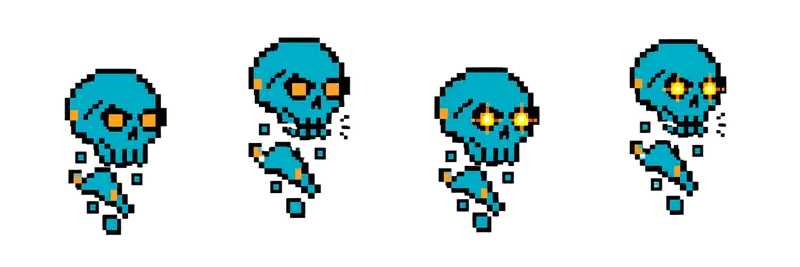
Pixel Floating Skull Sprite Sheet
A haunted skull bobbing in the air, trailing bone fragments while its eye sockets flicker with light. 4 frames in a single row, 200×267 px per cell (800×267 PNG, transparent background).
Settings
- Image size
- 800 × 267
- Grid
- 4 × 1
- Cell size
- 200×267
- Frames
- 4
How to use the Pixel Floating Skull Sprite Sheet
This haunted skull bobs in the air, trailing bone fragments while light flickers in its eye sockets. It is a clean, readable undead enemy for a crypt, a haunted house or a Halloween level, and it needs no legs, which makes it easy to move anywhere.
The PNG is 800×267 pixels with a transparent background and holds 4 frames in a single row. Each cell is 200×267 pixels, the same frame size used by the other creature strips in this gallery.
Slice it into 4 columns and 1 row at 200×267. In Unity, use Grid By Cell Size in the Sprite Editor. In Godot, open SpriteFrames and add frames from the sheet with 4 horizontal and 1 vertical. In Phaser, load it as a spritesheet with frameWidth 200 and frameHeight 267. Loop it at around 6 to 8 frames per second so the bob feels ghostly rather than jittery.
Floating enemies are fun to code: drift the skull toward the player slowly, let it pass through walls, or have it circle a point and fire a projectile every few seconds. The flickering eyes are a natural cue for when it attacks. It also works as a hazard that guards treasure, a companion for a necromancer character, or a decoration in a dungeon room that only comes alive when the lights go out.