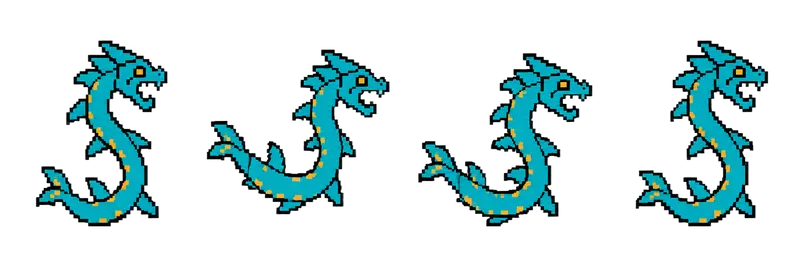
Pixel Sea Serpent Idle Sprite Sheet
A spined sea serpent coiling and uncoiling with its jaws open, ready to rise out of a lake or a water level. 4 frames in a single row, 200×267 px per cell (800×267 PNG, transparent background).
Settings
- Image size
- 800 × 267
- Grid
- 4 × 1
- Cell size
- 200×267
- Frames
- 4
How to use the Pixel Sea Serpent Idle Sprite Sheet
Water levels need something to fear under the surface, and this sea serpent fills that role. The spined serpent coils and uncoils with its jaws open, as if it has just risen out of the water and is deciding whether to strike. It reads as a lake guardian, a boss in a flooded temple, or a hazard the player must sail past.
The PNG is 800×267 pixels with a transparent background. It holds 4 frames in a single row with 200×267 pixel cells, the same cell size as the dragon, golem, spider and other creature strips in this gallery.
Slice it into 4 columns and 1 row at 200×267. In Unity, use the Sprite Editor's Grid By Cell Size. In Godot, add frames from the sheet with 4 horizontal and 1 vertical in the SpriteFrames editor. In Phaser, load it with frameWidth 200 and frameHeight 267 and create a looping animation from frames 0 to 3. A slow loop, around 5 to 8 frames per second, makes the coiling feel heavy and deliberate.
For a water effect, place the sprite behind a water layer so only its upper body shows, and tween it up and down to make it rise and sink. It also works on a pirate map, at the mouth of a sea cave, or as a mini-boss that surfaces between waves of smaller enemies.