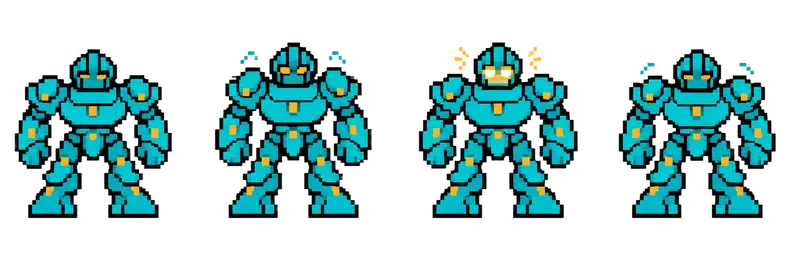
Pixel Stone Golem Idle Sprite Sheet
A hulking armored golem standing its ground while its eyes flare gold, a heavy guardian for a dungeon gate. 4 frames in a single row, 200×267 px per cell (800×267 PNG, transparent background).
Settings
- Image size
- 800 × 267
- Grid
- 4 × 1
- Cell size
- 200×267
- Frames
- 4
How to use the Pixel Stone Golem Idle Sprite Sheet
The golem is a slow, heavy guardian. It stands its ground in heavy armor plating while its eyes flare gold, which gives the player a clear signal that something is about to happen without the sprite ever moving from its spot. It suits a gatekeeper, a mid-dungeon boss, or a sentinel that only wakes up when the player gets close.
The PNG is 800×267 pixels with a transparent background and holds 4 frames in a single row. Each cell is 200×267 pixels, the same size used by the dragon, spider, serpent, bat, skull, slime, fox and item strips in this gallery, so one import setting covers the whole set.
Slice it into 4 columns and 1 row, or set the frame size to 200×267. In Unity, that is Grid By Cell Size in the Sprite Editor. In Godot, add frames from the sheet with 4 horizontal and 1 vertical. In Phaser, load it as a spritesheet with frameWidth 200 and frameHeight 267. Play it slowly, around 4 to 6 frames per second, so the glow feels like breathing instead of flickering.
Because the golem stays in place, it works well for enemies that block a corridor, puzzle bosses that must be defeated by pulling levers, or a stone statue that comes alive. Use the eye flare as the wind-up for an attack you add in code, such as a shockwave or a falling rock.