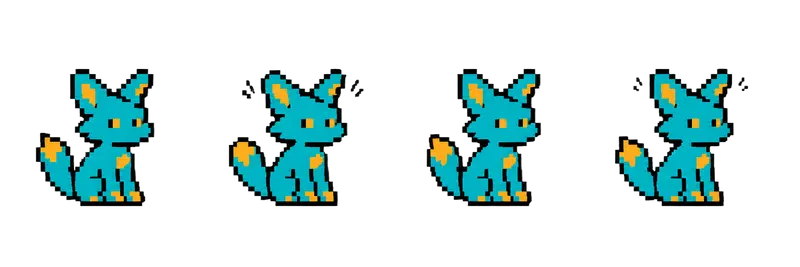
Pixel Fox Companion Idle Sprite Sheet
A sitting fox that twitches its ears and flicks its tail, a friendly companion or shop pet. 4 frames in a single row, 200×267 px per cell (800×267 PNG, transparent background).
Settings
- Image size
- 800 × 267
- Grid
- 4 × 1
- Cell size
- 200×267
- Frames
- 4
How to use the Pixel Fox Companion Idle Sprite Sheet
Not every sprite needs to fight. This fox sits calmly, twitching its ears and flicking its tail, which makes it a friendly companion, a shop pet or a bit of life in a village square. Small idle animations like this are what make a game world feel lived in.
The PNG is 800×267 pixels with a transparent background and holds 4 frames in a single row. Each cell is 200×267 pixels, the same frame size as the other creature strips in this gallery, so it drops into the same import setup.
Slice it into 4 columns and 1 row at 200×267. In Unity, use Grid By Cell Size in the Sprite Editor. In Godot, add frames from the sheet with 4 horizontal and 1 vertical. In Phaser, load it with frameWidth 200 and frameHeight 267. Idle animals look most natural when they are slow and a little irregular: loop it at 4 to 6 frames per second, or pause on the first frame for a random second or two between loops so the ear twitch does not feel mechanical.
Use the fox as a pet that follows the hero between areas, a shopkeeper's animal behind the counter, a character in a cozy farming game, or a spirit guide in a forest. If you need it to walk or run beside the player, open the generator with the fox as a reference and ask for those actions.