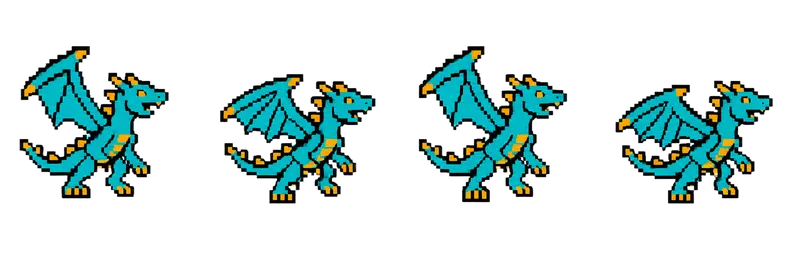
Pixel Dragon Boss Idle Sprite Sheet
A teal dragon rearing on its hind legs, flapping its wings and roaring between beats. Big enough to read as a boss. 4 frames in a single row, 200×267 px per cell (800×267 PNG, transparent background).
Settings
- Image size
- 800 × 267
- Grid
- 4 × 1
- Cell size
- 200×267
- Frames
- 4
How to use the Pixel Dragon Boss Idle Sprite Sheet
A dragon is the classic last fight, and this one is sized to feel like it. The teal dragon rears up on its hind legs, flaps its wings and roars between beats. It fills its frame and reads clearly as the biggest thing on screen, which is what a boss sprite needs to do.
The file is an 800×267 PNG with a transparent background. It holds 4 frames in a single row, and each cell is 200×267 pixels. That is the same cell size as most of the monster strips in this gallery, including the golem, spider, sea serpent, bat, skull and slime, so you can load them all with one frame setting.
Slice it at 200×267, or simply split it into 4 columns and 1 row. In Unity, use Grid By Cell Size; in Godot, add frames from the sheet with 4 horizontal and 1 vertical; in Phaser, load it with frameWidth 200 and frameHeight 267 and play frames 0 to 3 on a loop. Four frames loop smoothly at 6 to 8 frames per second, which suits a large creature. Played faster, it starts to look frantic.
Put it at the end of a dungeon, on a castle roof, or behind a locked door the player has been hearing about all game. Scale the sprite up for a boss arena, and turn off texture filtering so the pixels stay crisp when you do.