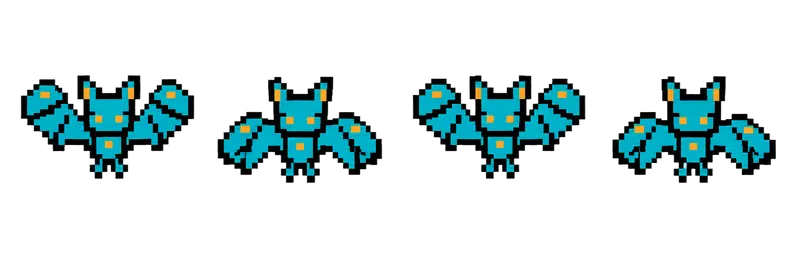
Pixel Bat Flying Sprite Sheet
A small bat hovering in place with a quick up-and-down wing beat, the classic first enemy in a cave. 4 frames in a single row, 200×267 px per cell (800×267 PNG, transparent background).
Settings
- Image size
- 800 × 267
- Grid
- 4 × 1
- Cell size
- 200×267
- Frames
- 4
How to use the Pixel Bat Flying Sprite Sheet
The bat is the classic first enemy in a cave: small, fast and easy to read. It hovers in place with a quick up-and-down wing beat, which keeps it looking alive even while it waits for the player to come close.
The file is an 800×267 transparent PNG with 4 frames in a single row. Each cell is 200×267 pixels, the same frame size as the other creature strips in this gallery, so the bat, skull and slime can share one import setting.
Slice it into 4 columns and 1 row. In Unity, set the frame size to 200×267 with Grid By Cell Size. In Godot, add frames from the sprite sheet with 4 horizontal and 1 vertical. In Phaser, load it with frameWidth 200 and frameHeight 267. Because a bat flaps quickly, it looks best at a higher frame rate than the larger monsters, around 10 to 14 frames per second.
The animation is drawn in place, so all the movement comes from your code. A sine wave on the vertical position gives a lazy flutter, a straight dive toward the player makes an attacker, and a random wander makes ambient cave life. Bats also work in swarms: spawn several and start each one on a different frame so they don't flap in sync. The cell is large for a small enemy, so scale it down in your engine to fit your tile size.